
SSH Workbench
A keyboard-driven terminal app for machines reached over SSH. Pick a machine, connect through OpenSSH, see whether it is reachable and set up key login.
- Status
- Version 0.3.4
- Updated
- October 31, 2026
- Source
- GitHub repository
Result Shipped version 0.3.4, which hands connections to the system OpenSSH client, never logs in for status checks, never handles a credential, and passes 1,141 automated tests on Windows and Ubuntu.
On this page
Defined what Workbench does, planned each release as small tested tasks and tested it on personal machines.
- Python 3.14
- Textual
- OpenSSH
- uv
- pytest
- Ruff
- GitHub Actions
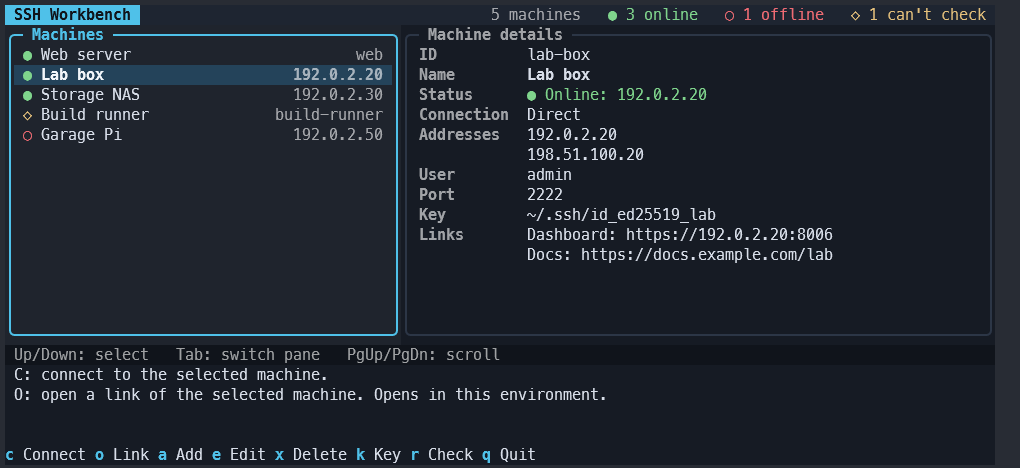
SSH Workbench is a terminal app that keeps a set of machines in one list, each with its way to connect and its web dashboards. Pressing C on a machine hands the terminal to the system's own OpenSSH client. When the session ends, the list comes back with the same machine selected.
It also shows whether each machine's SSH port is answering and walks through setting up key-based login. It runs on Windows 11 and Linux, and I've tested it against the homelab's Proxmox host, a Linux Mint laptop and two Windows PCs.
Why I wanted it
I wanted one place to see each machine, how to reach it and its web dashboards, and to connect without retyping SSH options. The tool shouldn't replace OpenSSH or store passwords: authentication, keys and host-key checks stay with the SSH client already in use.
What it does
| Key | What happens |
|---|---|
| C | Workbench suspends itself and runs ssh in the same terminal. Typing exit brings the list back. |
| R | Checks every machine's SSH port again. Checks also run at startup and every 30 seconds. |
| O | Opens one of the machine's web links, such as a Proxmox dashboard, in the default browser. |
| A, E | Adds or edits a machine in a form that checks each field before saving. |
| X | Deletes the selected machine after asking. |
| K | Sets up key login: pick or create a key, install it on the machine, then test a key-only login. |
Since 0.3.0 the header counts machines by status, and every status keeps its symbol and word, so nothing depends on color. The layout follows the terminal's size: under 60 columns the list sits above the details and the footer wraps onto two rows, and from 110 columns each row shows where the machine connects.
A machine is either an alias from the SSH config or a direct entry with addresses, user, port and key. A direct machine can also be exported as an SSH alias, so ssh <id> works in any terminal and in scripts.
Design decisions
- OpenSSH does the connecting
- Decision. Workbench checks every machine value against the same rules as its config file, then runs the system
sshwith an argument list, no shell, and--before the destination. - Why. No value from the machine file can turn into an SSH option or a shell command. Passwords, keys, the SSH agent and host-key prompts stay with OpenSSH.
- Status checks never log in
- Decision. A check opens a TCP connection to the SSH port and closes it without sending anything. For status, aliases are resolved with
ssh -Gonly at startup and on R. - Why. A check every 30 seconds should not add login attempts to a server's auth log.
ssh -Gcan run commands from the SSH config, so it never runs on a timer. - Saves never leave a half-written file
- Decision. Each save keeps a
.bakcopy and replaces the file in one step. If another program changed the file since it was loaded, Workbench reloads instead of overwriting. - Why. The machine file may be edited by hand or kept in a synced folder.
- Key setup never sees a secret
- Decision. K reads only
.pubfiles and runs two fixed commands on the machine, in the terminal it hands to SSH. - Why. SSH and
ssh-keygenask for passwords and passphrases themselves, so Workbench never handles a credential.
How I worked
I developed SSH Workbench with AI coding agents in a test-first workflow, setting each task's goal and acceptance criteria, approving every pull request and release, and testing the app on my own machines.
- One task per pull request, with written acceptance criteria in the roadmap.
- Tests first: each fix starts as a failing test.
- Every pull request, and every push to
mainor a version tag, runs Ruff, the full test suite, a package build and an installed-package check, on Windows and Ubuntu. - Real-machine checks use my own machines, and test keys are removed afterwards.
I tested the terminal handoff in Windows Terminal and, on October 30, had it checked in Ghostty on Linux. I run the released version as an installed tool.
Testing
The automated tests use fictional machines and a fake status checker. They never touch a real SSH config, key or network.
Around the 0.2.0 release, checks on my own machines covered the parts tests can't:
- On the Linux Mint laptop, and as administrator on both Windows PCs, Workbench installed a new key and a key-only login worked.
- Key setup on the Proxmox host, where the key file lives behind a cluster-filesystem link.
- A first connection that asked to trust a new host key. The fingerprint was compared before accepting.
Real use then turned up five key-setup problems, fixed in 0.2.1. For example, a commented-out copy of a key counted as installed, and PowerShell progress output leaked into the result on Windows.
Version 0.2.2 fixed three problems that reviews of earlier versions had set aside:
- Pressing Ctrl+C during key setup could still report "Key login works." and save the key. Now no later step runs after Ctrl+C.
- An RSA key too large for the Windows install command failed only after the password prompt. It is now refused before Workbench connects.
- A machine whose status check took over 30 seconds never left Checking, because each timer round replaced the check still running.
Each fix started as a failing test, and the Ctrl+C handling was also checked in Windows Terminal. The same release moved development and CI to Python 3.14.8 and uv 0.13.4 for their security fixes.
Checks of the 0.3.0 layout in Windows Terminal covered sizes from 47×16, the narrowest it allows, up to 199×46, including a resize with the edit form open. Before it replaced my installed copy, the release build went through a separate install and checks at 80×24, 50×24, 120×30 and 80×18, and it quit cleanly.
Versions 0.3.1 to 0.3.3, released October 23 and 24, fixed status and key-setup problems:
- Saving a machine while aliases were still being checked threw those checks away, and a
Match execcommand in the SSH config could draw over Workbench's screen. Version 0.3.1 fixed both, and a side-by-side comparison with 0.3.0 in Windows Terminal, using a fictional SSH config, checked each fix. - K could open an empty key list, and it silently left out keys the SSH config offers that have no valid
.pubfile. Since 0.3.2 it says when there is no key to offer and names those keys in a "Not listed" line under the list. - An install error on a Windows machine printed as a block of PowerShell's CLIXML. Version 0.3.2 prints it as plain text. Version 0.3.3 keeps it on one line and, for an administrator account, says the key is installed only once the key file's permissions are set.
For 0.3.2, a new script ran the POSIX key install command in bash, dash, zsh, fish and tcsh on a Linux Mint 22.3 machine, and all five passed. In 0.3.2 and 0.3.3, key setup against a Windows machine with an administrator account ended in a working key login. The 0.3.1, 0.3.2 and 0.3.3 release builds each went through the same four-size check in Windows Terminal.
On October 30 the terminal checks ran on a Linux desktop for the first time: Ghostty 1.4.0 on Arch Linux under Wayland, with the repository's fixture scripts in place of real SSH and key commands. They covered the layout at 56, 59 and 111 columns and at 19 rows, the terminal handoff, key setup and quitting to a working shell. A machine's link opened example.com in the default browser. The run also caught a bug in the terminal fixture: on Linux it started its stand-in SSH under the system Python instead of the project's environment, so every connection failed until the fixture was fixed. The full suite, 1,124 tests by then, passed there with PowerShell 7 available for the Windows-script tests.
Version 0.3.4, released October 31, fixed two problems. Letter keys now work with Caps Lock on or typed as capitals, each doing what its lowercase key does, and a newly selected machine shows its details from the top in its first frame, where before they could appear scrolled down as the previous machine's were. The release build passed the four-size check in Ghostty on Arch Linux, and in Windows Terminal, with Caps Lock on, C handed the terminal to the fixture's stand-in SSH and Q quit. Since this release the manual terminal checks cover Ghostty on Linux as well as Windows Terminal, and the terminal check script runs on Linux.
Limits
- macOS is untested.
- On a Linux desktop, Workbench has been checked in one terminal, Ghostty on Arch Linux, with fixture scripts and no real SSH connection.
- Saving rewrites the machine file in Workbench's own format, so comments and hand formatting are dropped. It asks before the first such save.
- The Caps Lock fix was checked with simulated key presses, not a physical Caps Lock key.
Sources
The repository has been public under the MIT license since October 24, 2026. This page draws on these files on main as of October 31, 2026, and on my project notes:
- README: features, platform support and install
- User guide: the machine file, every feature and troubleshooting
- Architecture notes: how the code is organized and why
- Changelog: what changed in each release
- Release 0.3.4: the release notes and install command
- Validation log: checks in real terminals and on real machines, including the Linux desktop checks
- Testing guide: the automated checks and the manual terminal checks
- CI runs: Ruff, tests, package build and installed-package check on Windows and Ubuntu