
SDEV 120 Computing Logic
Program design with pseudocode, flowcharts and UML, then Python loops and decisions and a team pay-calculator script.
- Term
- Fall 2025
- Covered
- 7 modules
- Source
- SDEV 120 repository
Wrote the pseudocode, drew the flowcharts and the UML diagram, filled in the workbooks and wrote the Python scripts. Served as team leader on the team project, responsible for employee data management and for security and compliance.
- Python 3.14 and IDLE
- Lucidchart
- Excel
- Pseudocode
Completed seven modules of program design and Python: modular pseudocode with hierarchy charts and flowcharts, a UML use-case diagram, loop and decision scripts with their IDLE output, and a team pay-calculator script.
On this page
Computing Logic was a programming foundations class: planning a program in pseudocode, flowcharts and UML before writing it, then writing small Python programs in IDLE. It ran as an eight-week late-start section.
What the course provided and what I did
The course provided the assignment prompts and scenarios, the Excel templates for Modules 1 and 3, Lucidchart for the diagrams, and the team project brief. My part:
- Wrote the pseudocode and drew the flowcharts, hierarchy charts and UML diagram
- Filled in the number-system, memory and logic-gate workbooks
- Wrote the Python for Modules 6 and 7 and the in-class practice scripts
- Led a five-person team project, responsible for employee data management and for security and compliance
Strongest work
Breaking a program into modules (Module 2)
The scenario was a cleaning service that charges a base fee plus a rate per bathroom and per other room. I drew a hierarchy chart first, then wrote the pseudocode as three modules: housekeeping asks for a customer's last name, the detail loop takes the room counts and shows the charge, and end-of-job closes the program. The rates are named constants, and typing ZZZZ as the name ends the loop:
Constants:
  BATHROOM_CHARGE = 15
  OTHER_ROOM_CHARGE = 10
  BASE_CHARGE = 40

Call Housekeeping Module

While lastName != "ZZZZ"
    Call Detail Loop Module
End While

Call End-of-Job Module
The flowchart matches it, with module-call symbols and a Yes/No loop on the sentinel. The second exercise, a contractor's job estimate, follows the same pattern: an HOURLY_RATE constant, materials marked up 20 percent from wholesale, and 0 hours to stop.
Planning a quiz game (Module 5)
I wrote the rules first: each question can be answered only once, a right answer adds points, a wrong one leaves the score alone, and the game has to handle invalid input. Then the rules became steps and the steps a flowchart. It loops while questions are left, sends an invalid choice back to the prompt, and branches on the answer before marking the question as answered.
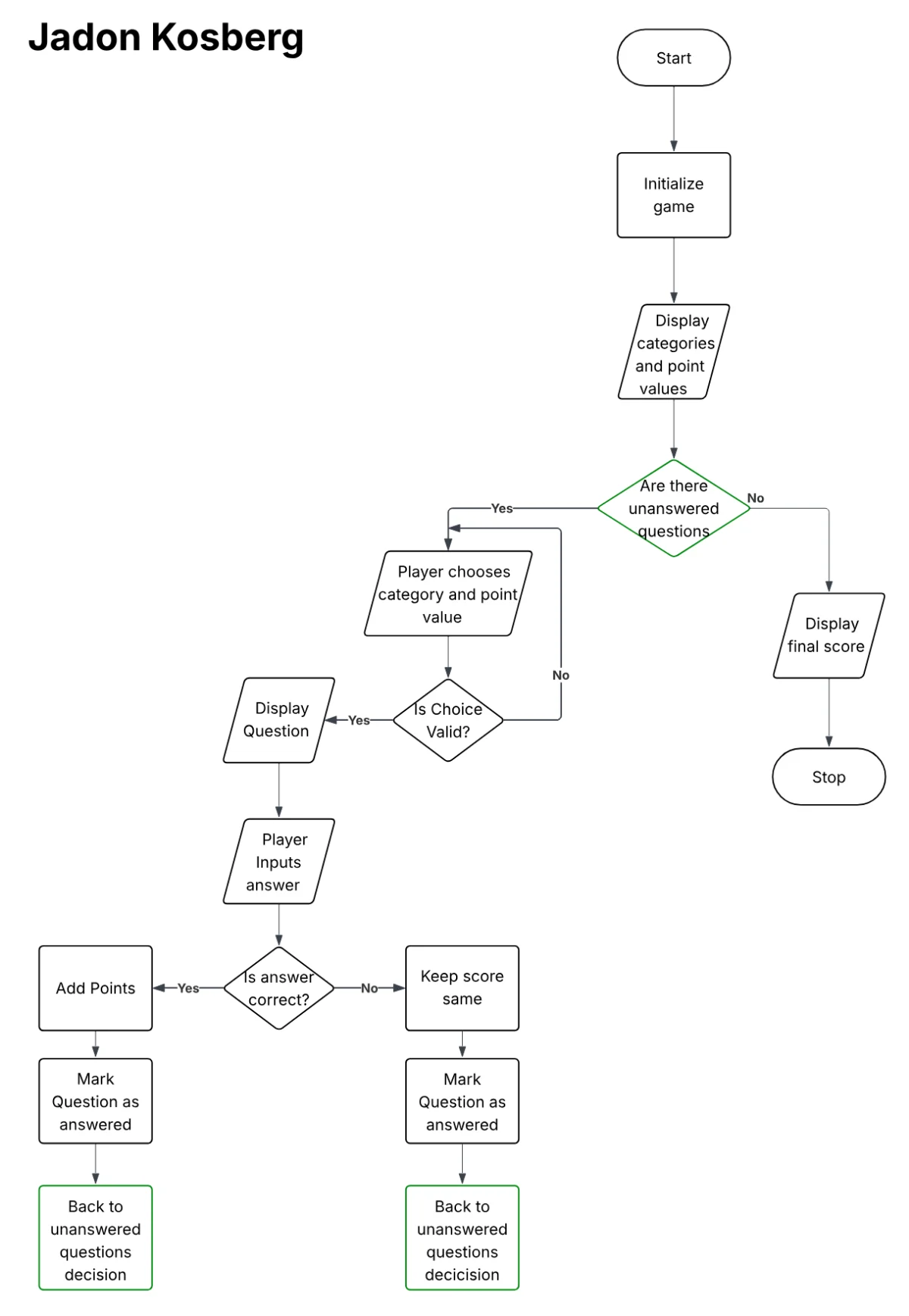
One step didn't make it from the plan into the chart: the plan ends by announcing a winner, and the chart only shows the final score.
The team pay calculator
I led the five-person team that built a payroll script in Python. The file doesn't mark who wrote which section, so this describes the team's code:
- Employee data: a table of ten employee IDs and hourly rates, and a loop that asks for an ID until it matches one
- Time tracking: a loop that rejects hours outside 0 to 80
- Payroll: 40 regular hours, overtime at 1.5 times the rate, flat 5.6 percent state and 7.9 percent federal tax, and net pay
- Export: collects ten employees and writes them to
Payroll.xlsxwith pandas
What I'd fix: typing a word for hours crashes it, because float() runs before the range check; the number of dependents is collected but never used; and the security side of my role doesn't show up in the code, which has no login and overwrites the spreadsheet without asking.
Labs
Planning and design
8 labs
| Lab | What it asked | Work done |
|---|---|---|
| Module 1 Rules of Pseudocode | State five pseudocode conventions | Paraphrased five rules: one statement per line, capitalized keywords, indentation, standard keywords and plain English |
| Module 1 Program development workbook | Order the development stages, name flowchart symbols and write pseudocode for weekly and yearly work hours | Put the seven stages in order, named the symbols and wrote the hours pseudocode |
| Module 1 Pseudocode and flowcharts | Plan three everyday tasks in pseudocode and Lucidchart | Planned miles per gallon, daily rent and making breakfast, each as pseudocode and a flowchart |
| Module 2 Cleaning-service charge | Hierarchy chart, pseudocode and flowchart for a service-charge program | Split it into housekeeping, detail loop and end-of-job modules with named constants and a ZZZZ sentinel (see above) |
| Module 2 Job cost estimate | The same pattern for a contractor's estimate | Wrote the modules with an hourly-rate constant, a 20 percent materials markup and a 0-hours sentinel |
| Module 2 Security Practices discussion | Explain why security matters when writing code | Wrote about input validation against SQL injection, encryption, access control and the 2017 Equifax breach |
| Module 5 Quiz game plan and flowchart | Plan a category-and-points quiz game and flowchart it | Wrote the rules and steps, then drew the flowchart (see above) |
| Module 5 UML Use Case Diagram | Draw a use-case diagram for an online shopping system | Drew three actors and ten use cases with include and extend links |
Computer foundations
2 labs
| Lab | What it asked | Work done |
|---|---|---|
| Module 3 Character Values | Convert four sentences to ASCII codes and answer two Unicode questions | Coded every character of the four sentences and answered the Unicode questions |
| Module 3 Memory | Memory and storage, networking basics and logic-gate truth tables | Sorted 18 memory and storage items, answered four networking questions and filled in the gate tables |
Languages, debugging and structures
5 labs
| Lab | What it asked | Work done |
|---|---|---|
| Module 4 Programming and scripting languages | Short essay with sources | Compared compiled and scripted languages and server-side scripting, with three sources |
| Module 4 Debugging exercise 1 | Review and debug a pseudocode program | Wrote how the review would go (logic and formatting first, then a peer review) and how flowcharts, indentation and comments prevent errors |
| Module 4 Number-guess flowchart | Use selection and loop structures | Drew a guess loop with "too high" and "too low" branches back to the input |
| Module 4 Dictionary-search flowchart | The same structures for a real-world task | Drew a search that flips forward or backward until it finds the word |
| Module 4 Group project check-in | Report the team's status | Reported the team's meeting schedule and the five roles |
Python
3 labs
| Lab | What it asked | Work done |
|---|---|---|
| Module 6 IDLE script | Variables and string concatenation | Built and printed a sentence from three variables and turned in the IDLE output |
| Module 7 Python using loops | A for loop with a decision |
Looped over 15 numbers and printed whether each is even or odd, with the IDLE output |
| Class 4 practice | Sequence, selection and a list loop | Took input, used a pass/fail if and built a list of employees in a loop |
Skills
- Pseudocode and modular program design (Modules 1, 2 and 5)
- Flowcharts, hierarchy charts and UML use-case diagrams in Lucidchart (Modules 1, 2, 4 and 5)
- Sequence, selection and loops (Module 4 flowcharts, Module 7, class practice)
- Python basics in IDLE: variables, strings, lists,
forloops andif(Modules 6 and 7) - Functions, dictionaries, input loops and an Excel export, as team code (pay calculator)
- Number systems, character encoding, memory and logic gates (Module 3)
- Leading a team project (Module 4 check-in)
- Writing about secure coding (Module 2 discussion)
Limits
- Most of this class is design work: pseudocode and diagrams that never ran. The only run output is the two IDLE screenshots for Modules 6 and 7.
- The pay calculator is the team's file, and the repository has no final project write-up. I haven't run it for this page; it needs pandas and an Excel writer.
- Debugging exercises 2 to 4 are the program listings only, without my changes.
- A few answers have mistakes: two spaces coded as "NULL" instead of 32 in the ASCII sheet, a NAND truth table filled in with NOR's values, and a UML diagram that draws Log In and Process Payment as extensions of Checkout where include fits better.
- The Module 6 flowchart is a Lucidchart link, not a file in the repository.
Sources
- SDEV 120 repository, with every assignment above
- Module 2 cleaning-service pseudocode and flowchart
- Module 5 quiz game plan and flowchart
- Team pay calculator
- Module 7 loop script
All coursework · SVAD 111 Linux and Virtualization Technologies · NETI 109 Networking I